Core mutual action plan
Use it when you want one clean plan to adapt to any B2B deal of 30 to 90 days.
6 MILESTONES · 19 ACTION ITEMS · 60 DAYS
By clicking "Accept", you agree to our use of cookies.
FREE TEMPLATE
Seven free templates in Excel and Word, a filled example of a real-sized enterprise deal, and a planner that dates every step back from the day the contract gets signed. No email, no signup.
7 TEMPLATES + FILLED EXAMPLE · EXCEL AND WORD · NO SIGNUP
UPDATED NOVEMBER 2026
PLANNER
Choose a deal type and the size of the buying team, set the date the contract should be signed, and every action item gets a due date counted back from it. Weekends move to the Friday before. Export it, or run it live.
Each type is one of the templates below, with its own milestones and timing.
The day the contract should be signed. Tie it to something on the buyer's calendar, like a go-live or a board meeting.
6 MILESTONES · 19 ACTION ITEMS
Showing the Core plan, counted in days before signature. Turn on JavaScript to set your own date.
| Action Item | Seller owner | Buyer owner |
|---|---|---|
| Hold a mutual planning call and agree on a target signature dateYou lead | Account Executive | Champion |
| Write down the three outcomes this purchase must deliverBuyer leads | Account Executive | Champion |
| List everyone who must approve the purchase, with their roleBuyer leads | Account Executive | Champion |
| Run a demo built around the agreed success criteriaYou lead | Sales Engineer | Technical Evaluator |
| Test the product against each success criterionBuyer leads | Sales Engineer | Technical Evaluator |
| Send the security questionnaire to the sellerBuyer leads | Seller Security | Security |
| Share the evaluation results with the buying groupBuyer leads | Account Executive | Champion |
| Draft the business case with cost, savings and payback periodYou lead | Account Executive | Champion |
| Return the completed questionnaire with the SOC 2 reportYou lead | Seller Security | Security |
| Confirm budget is approved for this purchaseBuyer leads | Account Executive | Economic Buyer |
| Present the business case to the Economic BuyerBuyer leads | Account Executive | Champion |
| Register the seller as a vendorBuyer leads | Deal Desk | Procurement |
| Send the order form and master agreementYou lead | Deal Desk | Procurement |
| Approve the security review or list the open findingsBuyer leads | Seller Security | Security |
| Return contract redlinesBuyer leads | Seller Legal | Legal |
| Agree final terms and pricingYou lead | Account Executive | Procurement |
| Route the contract for signatureBuyer leads | Deal Desk | Procurement |
| Sign the contractBuyer leadsSignature day | Account Executive | Economic Buyer |
| Book the kickoff call with the implementation teamYou leadSignature day | Implementation Lead | Champion |
Free plan, no credit card. Your buyer gets the plan in a Deal Room, with owners on both sides and status everyone can see.
TEMPLATES
Every template has the same ten columns and owners on both sides, so you can start with one and bolt on another. Download any of them as Excel or Word.
BEFORE SIGNATURE
Use it when you want one clean plan to adapt to any B2B deal of 30 to 90 days.
6 MILESTONES · 19 ACTION ITEMS · 60 DAYS
Use it when you want to see what a finished plan looks like before you write your own, with every row owned, dated and evidenced.
8 MILESTONES · 24 ACTION ITEMS · 70 DAYS
Use it when five or more people on the buying side must approve, and security, procurement and legal each run their own review.
9 MILESTONES · 29 ACTION ITEMS · 120 DAYS
Use it when one or two people decide, there is no formal procurement, and the deal should close in two to four weeks.
5 MILESTONES · 11 ACTION ITEMS · 21 DAYS
Use it when the buyer's security team runs a formal vendor risk review and you need it finished before legal signs off.
4 MILESTONES · 12 ACTION ITEMS · 38 DAYS
Use it when the decision is made but the contract still has to pass vendor onboarding, commercial review and legal redlines.
4 MILESTONES · 14 ACTION ITEMS · 40 DAYS
AFTER SIGNATURE
Use it when the contract is signed and you want the buyer to reach first value without repeating everything they told sales.
6 MILESTONES · 13 ACTION ITEMS · 90 DAYS AFTER SIGNATURE
Use it when a renewal is four months out and you want it signed early, with any expansion decided on proven results.
5 MILESTONES · 12 ACTION ITEMS · 120 DAYS
FILLED EXAMPLE
Fieldline sells sales forecasting software. Halvorsen Freight is replacing spreadsheet forecasts across 14 regional teams, and its CFO wants the new forecast live before a board meeting in late January. So the contract has to be signed by 11 December. Below is their plan as it stood four weeks before that date: most of the early work done, security and legal still open, and one risk written down where everyone can see it.
Fieldline, Halvorsen Freight and everyone named here are fictional. The plan is built the way a real one should be.
The date has a reason.
The first row ties 11 December to the board meeting on 28 January. When someone asks to push signature, that note is the answer.
The risk is in the plan, not in your head.
The security sign-off row says Nadia is out 23 to 27 November, so approval has to land by Friday 20 November or signature slips a week.
Every done row has proof.
"Completed" always comes with evidence: a signed approval, a vendor ID, minutes from a meeting. If you can't name the evidence, the row isn't done.
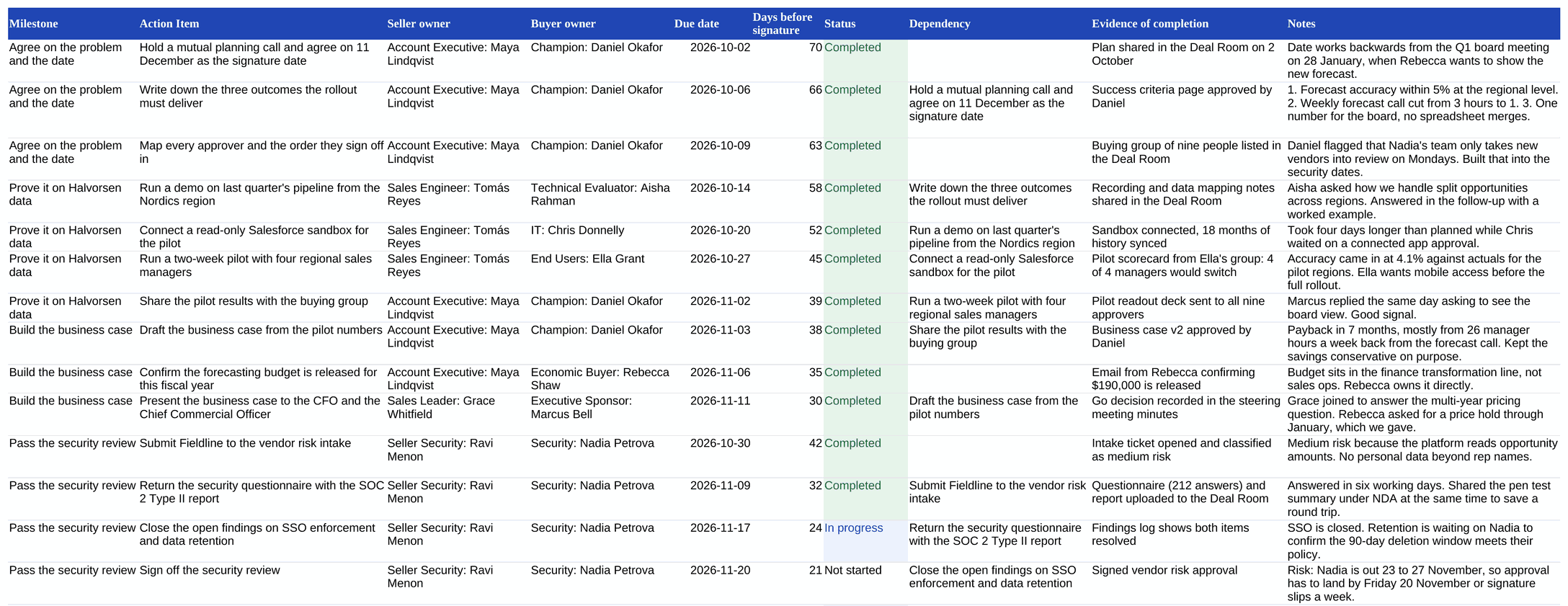
| Milestone | Action Item | Seller owner | Buyer owner | Due date | Days before signature | Status | Dependency | Evidence of completion | Notes |
|---|---|---|---|---|---|---|---|---|---|
| Agree on the problem and the date | Hold a mutual planning call and agree on 11 December as the signature date | Account Executive: Maya Lindqvist | Champion: Daniel Okafor | 2 Oct 2026 | 70 | Completed | Plan shared in the Deal Room on 2 October | Date works backwards from the Q1 board meeting on 28 January, when Rebecca wants to show the new forecast. | |
| Agree on the problem and the date | Write down the three outcomes the rollout must deliver | Account Executive: Maya Lindqvist | Champion: Daniel Okafor | 6 Oct 2026 | 66 | Completed | Hold a mutual planning call and agree on 11 December as the signature date | Success criteria page approved by Daniel | 1. Forecast accuracy within 5% at the regional level. 2. Weekly forecast call cut from 3 hours to 1. 3. One number for the board, no spreadsheet merges. |
| Agree on the problem and the date | Map every approver and the order they sign off in | Account Executive: Maya Lindqvist | Champion: Daniel Okafor | 9 Oct 2026 | 63 | Completed | Buying group of nine people listed in the Deal Room | Daniel flagged that Nadia's team only takes new vendors into review on Mondays. Built that into the security dates. | |
| Prove it on Halvorsen data | Run a demo on last quarter's pipeline from the Nordics region | Sales Engineer: Tomás Reyes | Technical Evaluator: Aisha Rahman | 14 Oct 2026 | 58 | Completed | Write down the three outcomes the rollout must deliver | Recording and data mapping notes shared in the Deal Room | Aisha asked how we handle split opportunities across regions. Answered in the follow-up with a worked example. |
| Prove it on Halvorsen data | Connect a read-only Salesforce sandbox for the pilot | Sales Engineer: Tomás Reyes | IT: Chris Donnelly | 20 Oct 2026 | 52 | Completed | Run a demo on last quarter's pipeline from the Nordics region | Sandbox connected, 18 months of history synced | Took four days longer than planned while Chris waited on a connected app approval. |
| Prove it on Halvorsen data | Run a two-week pilot with four regional sales managers | Sales Engineer: Tomás Reyes | End Users: Ella Grant | 27 Oct 2026 | 45 | Completed | Connect a read-only Salesforce sandbox for the pilot | Pilot scorecard from Ella's group: 4 of 4 managers would switch | Accuracy came in at 4.1% against actuals for the pilot regions. Ella wants mobile access before the full rollout. |
| Prove it on Halvorsen data | Share the pilot results with the buying group | Account Executive: Maya Lindqvist | Champion: Daniel Okafor | 2 Nov 2026 | 39 | Completed | Run a two-week pilot with four regional sales managers | Pilot readout deck sent to all nine approvers | Marcus replied the same day asking to see the board view. Good signal. |
| Build the business case | Draft the business case from the pilot numbers | Account Executive: Maya Lindqvist | Champion: Daniel Okafor | 3 Nov 2026 | 38 | Completed | Share the pilot results with the buying group | Business case v2 approved by Daniel | Payback in 7 months, mostly from 26 manager hours a week back from the forecast call. Kept the savings conservative on purpose. |
| Build the business case | Confirm the forecasting budget is released for this fiscal year | Account Executive: Maya Lindqvist | Economic Buyer: Rebecca Shaw | 6 Nov 2026 | 35 | Completed | Email from Rebecca confirming $190,000 is released | Budget sits in the finance transformation line, not sales ops. Rebecca owns it directly. | |
| Build the business case | Present the business case to the CFO and the Chief Commercial Officer | Sales Leader: Grace Whitfield | Executive Sponsor: Marcus Bell | 11 Nov 2026 | 30 | Completed | Draft the business case from the pilot numbers | Go decision recorded in the steering meeting minutes | Grace joined to answer the multi-year pricing question. Rebecca asked for a price hold through January, which we gave. |
| Pass the security review | Submit Fieldline to the vendor risk intake | Seller Security: Ravi Menon | Security: Nadia Petrova | 30 Oct 2026 | 42 | Completed | Intake ticket opened and classified as medium risk | Medium risk because the platform reads opportunity amounts. No personal data beyond rep names. | |
| Pass the security review | Return the security questionnaire with the SOC 2 Type II report | Seller Security: Ravi Menon | Security: Nadia Petrova | 9 Nov 2026 | 32 | Completed | Submit Fieldline to the vendor risk intake | Questionnaire (212 answers) and report uploaded to the Deal Room | Answered in six working days. Shared the pen test summary under NDA at the same time to save a round trip. |
| Pass the security review | Close the open findings on SSO enforcement and data retention | Seller Security: Ravi Menon | Security: Nadia Petrova | 17 Nov 2026 | 24 | In progress | Return the security questionnaire with the SOC 2 Type II report | Findings log shows both items resolved | SSO is closed. Retention is waiting on Nadia to confirm the 90-day deletion window meets their policy. |
| Pass the security review | Sign off the security review | Seller Security: Ravi Menon | Security: Nadia Petrova | 20 Nov 2026 | 21 | Not started | Close the open findings on SSO enforcement and data retention | Signed vendor risk approval | Risk: Nadia is out 23 to 27 November, so approval has to land by Friday 20 November or signature slips a week. |
| Confirm the integration plan | Review the integration diagram for Salesforce and the data warehouse | Sales Engineer: Tomás Reyes | IT: Chris Donnelly | 13 Nov 2026 | 28 | In progress | Diagram approved in the architecture review | Chris wants the warehouse sync to run nightly, not hourly, to stay inside their Snowflake credit budget. | |
| Confirm the integration plan | Confirm SSO through Okta and the user provisioning method | Sales Engineer: Tomás Reyes | IT: Chris Donnelly | 19 Nov 2026 | 22 | Not started | Review the integration diagram for Salesforce and the data warehouse | Okta app request approved | SCIM provisioning agreed in principle. Needs a ticket in their IT queue, five-day lead time. |
| Agree the contract | Register Fieldline as a vendor in Coupa | Deal Desk: Owen Park | Procurement: Julia Moreau | 12 Nov 2026 | 29 | Completed | Vendor ID FV-20931 issued | Tax forms and bank details sent the same day Julia asked. | |
| Agree the contract | Send the order form and master subscription agreement | Deal Desk: Owen Park | Procurement: Julia Moreau | 13 Nov 2026 | 28 | Completed | Contract package sent to Julia and Ben | Sent on our paper. Ben agreed after seeing the DPA already covers their EU subsidiaries. | |
| Agree the contract | Return redlines on the master subscription agreement | Seller Legal: Hannah Brooks | Legal: Ben Adeyemi | 23 Nov 2026 | 18 | In progress | Send the order form and master subscription agreement | Redlined agreement received | Ben expects to push on the liability cap and the data processing addendum. Hannah has pre-approved fallback language for both. |
| Agree the contract | Agree final pricing and payment terms | Account Executive: Maya Lindqvist | Procurement: Julia Moreau | 1 Dec 2026 | 10 | Not started | Return redlines on the master subscription agreement | Final order form with no open comments | Julia asked for net 60. We can offer net 45 with annual upfront billing. |
| Sign | Route the contract to the CFO for signature in DocuSign | Deal Desk: Owen Park | Procurement: Julia Moreau | 8 Dec 2026 | 3 | Not started | Agree final pricing and payment terms | DocuSign envelope sent | Rebecca signs on Tuesdays and Fridays. Envelope must be in her queue by Tuesday 8 December. |
| Sign | Sign the order form | Sales Leader: Grace Whitfield | Economic Buyer: Rebecca Shaw | 11 Dec 2026 | 0 | Not started | Route the contract to the CFO for signature in DocuSign | Countersigned order form | Grace countersigns the same day. |
| Get ready to start | Name the Halvorsen project lead and system admins | Implementation Lead: Lena Hoffmann | Champion: Daniel Okafor | 4 Dec 2026 | 7 | Not started | Project team listed in the Deal Room | Daniel leads, with Aisha and one admin from Chris's team. | |
| Get ready to start | Book the kickoff for the week of 14 December | Implementation Lead: Lena Hoffmann | Champion: Daniel Okafor | 11 Dec 2026 | 0 | Not started | Name the Halvorsen project lead and system admins | Kickoff invite accepted by the project team | Target: first regions live by 22 January, six days before the board meeting. |
A mutual action plan is a shared, dated list of every step both sides have to take between today and a signed contract, with a named owner for each step on each side. The seller drafts it. The buyer corrects it. Then both teams work from the same version until signature, and often past it into onboarding.
Don't confuse it with your forecast or your private close plan. A close plan answers "how do I win this?" and stays in your CRM. A mutual action plan answers "what do we both need to do, by when, to get your team what it wants?" and lives somewhere the buyer can see and edit.
The full definition is in the glossary: Mutual action plan
Too early and it reads as presumptuous. Too late and the buyer already has their own timeline, without you in it. Propose the plan when three things are true:
In most deals that is the end of the first or second real conversation after discovery, and before the demo for the wider team. A useful test: if you are about to ask "what does your buying process look like?", propose the plan instead. It asks the same question and gets a better answer, because the buyer is correcting a draft instead of describing a process from memory.
When not to: a single decision-maker buying on a card with standard terms. The SMB template exists for small deals, but if the whole thing closes in a week, an email with three dates is enough.
Plans dated forwards fail in a predictable way: "demo next week, pilot the week after, and we'll see". Dated forwards, every delay pushes the end date and nobody notices. Dated backwards, every delay eats into a fixed date, and everyone can see what it costs.
Ask what has to be true on their side, and by when. "Live before the board meeting on 28 January" is an event. "Signed by end of quarter" is your problem, not theirs, and a buyer can tell.
If the buyer needs to be live on 28 January and onboarding takes six weeks, signature has to happen in mid December. That is your target signature date. Say this sum out loud on the planning call. It is the most persuasive sentence in the whole process.
Before you date a single row, ask about the calendar: holidays and shutdowns, board and budget dates, the days the signer signs, the day the security team takes new vendors into review, anyone on leave. In the filled example, the CFO only signs on Tuesdays and Fridays and the security lead is out for a week in November. Both are in the plan.
Security review, procurement and legal usually run in parallel with the evaluation, and one of them is the long pole. Ask each owner how long their step takes and write their answer down, not your guess. Then start that track far enough out that it finishes before the contract step that depends on it.
The last week holds only routing and signing. If redlines are still open five days before signature, the date is already at risk, and the plan should say so in the Notes column.
Dates will slip. What matters is that someone decides what gives. When a row moves, check what depends on it and either move those too or agree what to compress.
The planner above does the counting for you: pick a date and every row is dated back from it, with weekends moved to Friday.
How the templates count. Every row in every template carries a "Days before signature" number. The Core plan starts 60 days out, Enterprise 120, SMB 21. These are starting points for you to correct with your buyer's real lead times, not a benchmark.
Every template uses the same columns. Each one is there because a plan without it breaks in a specific way.
| Column | What goes in it | Why it's there |
|---|---|---|
| Milestone | A stage both sides would recognise: "Pass the security review", "Agree the contract". | Lets the buying group see where the deal is without reading every row. |
| Action Item | One step, written as a verb and an object: "Return redlines on the master agreement". | If a row can't start with a verb, nobody can own it. |
| Seller owner | The person on your team, by role and name. | Your buyer needs to know who to chase, too. |
| Buyer owner | The person on their team, by stakeholder role and name. | The column most plans leave blank, and the one that makes the plan mutual. |
| Due date | A calendar date, counted back from signature. | "Next week" can't slip in a way anyone notices. A date can. |
| Days before signature | How far before signature the step lands. | Lets you re-date the whole plan in one move when signature moves. |
| Status | Not started, in progress or completed. | Three states are enough. Anything finer turns into arguing about the label. |
| Dependency | The step that has to finish first. | Shows what really slips when one row slips. |
| Evidence of completion | What proves it's done: a signed approval, a vendor ID, meeting minutes. | Stops "completed" from meaning "I sent an email about it". |
| Notes | Context, risks, decisions, names. | Where the plan remembers why. Most of the filled example's value is in this column. |
Two rules that make the columns work:
The buyer owner column is the hard part. You know your own team. On their side you are guessing names from a LinkedIn search and the CC line of an email. Here is who usually owns which milestones, what they need from you, and the question that finds them when you don't know who they are.
Your champion is the one who fills the gaps. Bring them this list and ask, row by row, "who is this at your company?"
Small deal, small list. On a deal where one or two people decide, the Champion and the Economic Buyer are often the same person, and that's fine. Keep the rows, put the same name in them, and the plan still tells you what has to happen.
When you don't know the name yet, write the role and leave the name empty. A row owned by "Security: name to confirm" is a question you can ask on the next call. A row with no owner at all is a step nobody will do.
A plan only the seller updates is a status report. The plan works when the buyer edits it, owns rows in it and quotes it to their own team. You can't demand that. You can make it the easy option.
Never show up with a blank template and ask the buyer to fill it in. Never show up with a finished plan and ask them to sign off. Show up with a draft that is mostly right, with gaps you've left on purpose, and ask them to fix it. People will correct a wrong draft long before they'll write a first one, and every correction is a commitment they made themselves.
Leave these gaps for the buyer to fill: the names of their approvers, the lead times of their internal reviews, and the reason for the date. Those are the three things you can't know and they can't dispute once they've written them.
Say it at the end of a call where they've just told you the problem and the date. Something like:
"It sounds like having this live before the board meeting is what matters. I've seen these stall when nobody maps the steps on both sides. Can we take 30 minutes this week to sketch it out backwards from that date? I'll bring a draft so you're correcting, not starting from scratch."
Why it works: it's framed around their date, it names the risk without blaming anyone, and "correcting, not starting from scratch" removes the work.
Send it a day ahead with a short note:
Subject: Draft plan to [their event]
Hi [name],
Here's a first pass at the steps between now and [their event], counted back from a signature on [date]. I've guessed at a lot on your side, so please don't take any of it as decided. Three things I couldn't know:
- Who needs to approve, and in what order
- How long your security and legal reviews usually take
- Anything on your calendar that blocks dates: holidays, board meetings, people out
We can go through it together on [day]. Mark it up as much as you like before then.
[your name]
Finish with one question: "If we hit every date on here, is there anything that would still stop this being signed on [date]?" The answer is the risk that belongs in the Notes column.
Ask your champion to share the plan with their approvers themselves, not you. A plan forwarded by a colleague is an internal project. A plan sent by a vendor is a sales tactic. Offer to write the cover note for them:
"Team, [vendor] and I have mapped out what it takes to be live before [event]. Your part is marked with your name. Can you check your dates are realistic and tell me by Friday if anything is off?"
"We don't really do that kind of thing."
"Fair enough. It's less a process than a list of who needs to do what before [event]. If it's useless after one call, we'll drop it."
"Just send us the proposal."
"Happy to, I'll send it today. The thing I'd worry about is the steps after it: security, legal, procurement. Can I put the dates on one page so nothing surprises us in [month]?"
"Procurement handles all that."
"Great, then they should own those rows. Who's the right person there, and could they look at their part of the plan this week?"
"I can't commit for other people's dates."
"You don't have to. Put their names on the rows, and I'll write a note you can forward asking them to check their own dates."
"This feels like you're pushing for a close date."
"The date's yours, not mine: it's [their event] minus onboarding. If that date is wrong, let's change it. The point is that we both see the same one."
Start with one base plan, then add a sub-plan when a track needs more detail than one milestone can hold.
Base plans (pick one):
Sub-plans (add to a base plan):
After signature:
Not sure? Use this:
| If your deal... | Use |
|---|---|
| Closes in under a month with one or two decision-makers | SMB mutual action plan |
| Takes one to three months with a handful of approvers | Core mutual action plan |
| Has five or more approvers and formal reviews | Enterprise mutual action plan |
| Is stuck in security review | Core or Enterprise, plus the Security review sub-plan |
| Is decided but not signed | Procurement and legal sub-plan |
| Just signed | Onboarding handoff plan |
| Renews in the next four months | Renewal and expansion plan |
Want to see one done properly first? Read the filled example.
The templates on this page are free and they work. A shared spreadsheet is a fine place to run a mutual action plan, and plenty of deals close on one. It starts to strain in three places:
In demoshake the plan lives inside a Deal Room: a shared space you prepare for one deal and open to the buyer's team. The action plan holds the same shape as these templates: milestones, each with action items, each assigned to someone on your team or theirs, with status everyone can see, from not started to completed. The content that goes with each step sits in the same room, split by stakeholder role, so security finds the security answers and the Economic Buyer finds the business case. AI can draft the first version of the plan from what the room already knows, and you edit it.
| Compared on | Spreadsheet template | demoshake Deal Room |
|---|---|---|
| Cost | Free | Free plan, no credit card |
| Where it lives | A file you share | One link per stakeholder |
| Owners on both sides | Typed into a column | Action items assigned to people |
| Status | Typed by whoever updates it | Not started, in progress, completed, visible to both sides |
| Supporting content | Somewhere else | In the same room, per stakeholder role |
| Who has seen it | Depends on the file host, rarely per person | Who opened the room on every plan. What they read on Pro. |
| First draft | You write it from a template | AI drafts it, you edit it |
QUESTIONS
Put the plan, the owners and the content for each stakeholder in one Deal Room. Free to start.
FREE PLAN · NO CREDIT CARD